• While Stormtrack has discontinued its hosting of SpotterNetwork support on the forums, keep in mind that support for SpotterNetwork issues is available by emailing [email protected].

Aurora event November 11-12, 2025

Dusty: “The suck zone…it’s the point, basically at which the twister sucks you up, but that’s not that technical term for it obviously…”

I recently noticed an unusual, yet intriguing colloquial phrase regarding this week's space weather: Cannibal geomagnetic storm.
This apparently applies when a second CME that travels quicker than a previous one ahead of it merges with it to create an enhanced aurora.
 
Given that we might get another one or two episodes like we’ve seen during this recent solar max, I began thinking about the somewhat easy as well as the more difficult aspects of photographing the northern lights.

The good if not relatively easier part includes picking out a favorable foreground as mentioned here before. I like the idea of water, where reflections abound; I’m thinking of possible places.

Tougher aspects include the movement of the curtains and their exposure given the very categorization of aurora light.
We know that it occasionally pulsates, flickers or possesses ripples, but in another way, the brighter patches and curtains can move far more than I recently believed. Consider how long of an exposure they should get before they lose their distinctness and get smeary looking.

Another issue. One photographs northern lights as emitted light transmitted through the atmosphere, different than say light reflected from a flower or incident light falling on a classic car that you might photograph.
This very direct light results in a problem with the photographic gamma…the "blown out" mid-tones that look super neon-like.

Apparently, you can correct a bit for problematic gamma in post-processing.
I don’t have all the answers, just food for thought for the next solar storm.
 
Given that we might get another one or two episodes like we’ve seen during this recent solar max, I began thinking about the somewhat easy as well as the more difficult aspects of photographing the northern lights.

The good if not relatively easier part includes picking out a favorable foreground as mentioned here before. I like the idea of water, where reflections abound; I’m thinking of possible places.

Tougher aspects include the movement of the curtains and their exposure given the very categorization of aurora light.
We know that it occasionally pulsates, flickers or possesses ripples, but in another way, the brighter patches and curtains can move far more than I recently believed. Consider how long of an exposure they should get before they lose their distinctness and get smeary looking.

Another issue. One photographs northern lights as emitted light transmitted through the atmosphere, different than say light reflected from a flower or incident light falling on a classic car that you might photograph.
This very direct light results in a problem with the photographic gamma…the "blown out" mid-tones that look super neon-like.

Apparently, you can correct a bit for problematic gamma in post-processing.
I don’t have all the answers, just food for thought for the next solar storm.
I find it helpful when people post their settings with their photographs, including such details as time, location, and direction being faced. That’s a start, at least, to point others in the “right” direction, even though conditions change a lot between times and locations.
 
For most aurora, I'm at 800ISO with a wide-open aperture (in my 10-22mm's case, that is F4.5) with exposures between 10-30 seconds. When they get bright or I know they will be bright, I dial back the ISO to 400 and shorten the exposure time as needed. With these I was at 800ISO, F4.5 at 13 seconds. For this event, that worked until the big substorms, which intermittently overexposed. I was doing a timelapse, so I just let it go rather than break the timelapse to adjust.

As a caveat, that is mid-latitude aurora down here. Up north, everything is brighter. I would imagine up in Minnesota and North Dakota you could do 100ISO at wide-open aperture with much shorter exposure times, but I'll defer to those who have done that to chime in.
 
For most aurora, I'm at 800ISO with a wide-open aperture (in my 10-22mm's case, that is F4.5) with exposures between 10-30 seconds. When they get bright or I know they will be bright, I dial back the ISO to 400 and shorten the exposure time as needed. With these I was at 800ISO, F4.5 at 13 seconds. For this event, that worked until the big substorms, which intermittently overexposed. I was doing a timelapse, so I just let it go rather than break the timelapse to adjust.

As a caveat, that is mid-latitude aurora down here. Up north, everything is brighter. I would imagine up in Minnesota and North Dakota you could do 100ISO at wide-open aperture with much shorter exposure times, but I'll defer to those who have done that to chime in.
I appreciate you listing your settings. ISO 800 is probably a good place to start if we get a second chance.

I know there are a lot of variables, and the settings that worked in Owasso on Tuesday 11/11 (ISO 400, exposure time of 25 seconds, and f/5.6) would not necessarily work elsewhere.

I found that ISO 400 was insufficient the next evening at about 8PM CST despite being in a darker location north of Owasso...I apparently missed the brightest part of the event, catching it as it waned. No surprise, then, that in post-processing I had to bump the exposure by about +1.75 EV to get something credible.

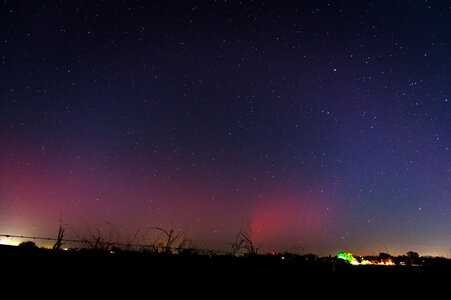
For comparison, this is what it looked like Wednesday night from NE Oklahoma. So different even from other images posted from Wednesday! But knowing the time and the observation that the aurora was weakening puts this faint aurora picture into context.

DSC_2870a.jpg
11/12/2025. Looking NE from a site north of Owasso at ~8PM CST;
Camera Settings: Nikon Z6 with 24mm lens; ISO 400, Exposure: 25 seconds, f/5.6.

Light pollution from the city of Bartlesville is visible at left, on the northern horizon. The constellation Auriga is visible in the top right quadrant of the image. The exposure was bumped +1.75 EV in RawTherapee as part of post-processing.
 
Last edited:
Beautiful photos guys!

Nothing like what any of you saw, but I was able to naked-eye see some of it where I am...
To my north & east there's a huge amount of light pollution (so much so, that you see no stars at all in the lower part of the sky) - thats all due to Denver/Aurora/the suburbs.

I knew there was a chance of aurora that night, so I planned to go outside & look... after dinner I went up to the roof to finish with testing some Christmas lights I'd been putting up(stuff that won't be turned on til the end of the month). And I looked up and out to the northeast: there it was, well above all the city-light-glow, a patch of glowing magenta in the sky, so a bit earlier than Planned I started my skywatching. :)

Earlier on I could see patches of magenta - and easily visible if you looked for them (where in previous events its always been faint glows).
They seemed to appear in the northeast & slowly drift west while also slowly fading out. there were a few waves of this then it shut down for awhile(not sure how long I sat up there watching. .lol.)
I went back out later a couple times & caught some more, and on the last time I even saw some green - a color I have never seen before!

I tried to take pictures but nothing turned out even using manual settings. My main camera (a basic camcorder) can't do any of that fancy stuff like long-exposures.

All in all I can say I was pretty impressed, and also that this is the best one I've ever seen. I can only imagine how great it would have been if I'd been in the mountains away from all that city light!
 
I tried to take pictures but nothing turned out even using manual settings. My main camera (a basic camcorder) can't do any of that fancy stuff like long-exposures.

All in all I can say I was pretty impressed, and also that this is the best one I've ever seen. I can only imagine how great it would have been if I'd been in the mountains away from all that city light!
@James K, surprisingly, iPhones did not do such a bad job with the aurora either night. It is no surprise, though, that resulting images were noisier on the 12th, with a less intense aurora and getting weaker with time.

The aurora was very faintly visible to the naked eye when as I got situated, so I used my iPhone to "scout" the best field of view.

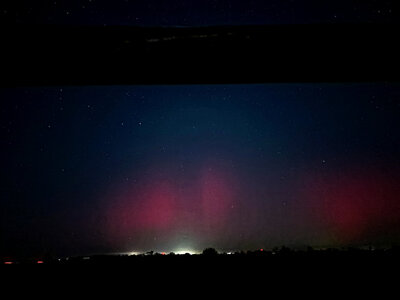
The iPhone 15 has a "Night Mode" which permits relatively low noise images under low-light level conditions. The following picture was taken with settings automatically set by the phone as ISO 8000 (8000??...don't ask, as I have no idea!) and exposure time of 5.3 seconds. When I took this I had no idea it would be the "brightest aurora" of the night, at least for me 🤦‍♂️.

IMG_7455_HEIC_wo_Color_Appearance_and_Lighting.jpg
iPhone 15 picture of aurora taken approximately 8:45 PM on 11/12/2025, looking North from a site north of Owasso, OK. Exposure settings: ISO 8000 and exposure time of 5.3 seconds, determined by the iPhone 15 camera app. Admission: I used Raw Therapee's Haze Removal tool to remove a lot of the integrated light pollution from Bartlesville.

I just hope to get another chance. Apparently there was another CME yesterday from a new sunspot that will be just rotating to face the earth in the next day or so. So with a little luck I will manage to get a picture of a bright aurora AND at a dark site.
 
_DSC0350 6.58.03 PM.jpeg
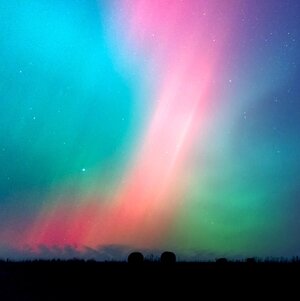
The exposure that Dan mentioned works out to -3.5 EV, which I believe is spot on. I hurriedly used ISO 3200, but would have preferred 800.
I also noticed some people adjust the color balance/temperature for photos to 3500-4000K. I did that for the above w/ RAW post-processing.
 
Last edited:
The exposure that Dan mentioned works out to -3.5 EV, which I believe is spot on. I hurriedly used ISO 3200, but would have preferred 800.
I also noticed some people adjust the color balance/temperature for photos to 3500-4000K. I did that for the above w/ RAW post-processing.
I like these new colors better--more aesthetically pleasing--and this is a great picture even in the original. But I wonder about the color balance adjustment you mention that others apply--what is the physical justification for it?
 
Oh... thanks; I like the pastel colors represented here a lot, too.
I suppose you cannot rely on the camera to automatically guess the right color/white balance at night for auroras.
So you want to set it at the start, or reset it later in post. Also, I do agree...iPhones take a lot of amazing, computational photographs.
 
Last edited:
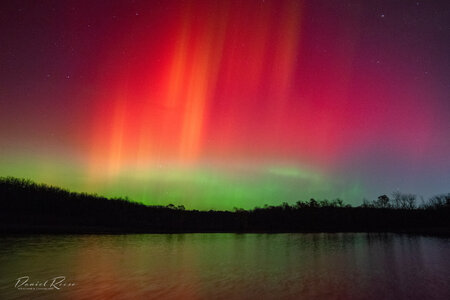
Of the three aurora displays I've seen in northeast Kansas over the past 18 months, this was probably the best and brightest. From the darker sky just west of Lawrence, the reds and greens were pretty apparent to the naked eye, and even the classic "dancing" of the vertical beams.

Some good discussion on camera settings here. I don't have a ton of experience shooting the aurora, but what I'd always heard was the brighter and faster moving the lights, the faster the shutter speed you should go with. In this case, the vertical beams were really dancing around, so a shorter shutter speed of just a couple seconds (and higher ISO) kept them from being smoothed out too much. Using my 14mm astrophotography lens - the settings I went with were f2.8, ISO 3200, 2.5" shutter speed. As mentioned by others here, the toughest part was definitely finding the right white balance to use. The picture here is auto white balance at around 2900 K. Felt like that looked the best, though a slightly warmer white balance might be a bit more true to life.

DSC_8605.jpg
 
gdlewen said:
@James K, surprisingly, iPhones did not do such a bad job with the aurora either night. It is no surprise, though, that resulting images were noisier on the 12th, with a less intense aurora and getting weaker with time.
(...)
I just hope to get another chance. Apparently there was another CME yesterday from a new sunspot that will be just rotating to face the earth in the next day or so. So with a little luck I will manage to get a picture of a bright aurora AND at a dark site.
Yep! My sister sent me a couple taken with her iPhone (I'm assuming using night mode) and they turned out pretty good. (she said it was only faintly naked-eye visible for her),
My older (and a more basic model) Samsung doesn't have any night-mode or long-exposure options, but I think the newer/higher end ones do (though I have no plans to upgrade since my phone does just fine for what I need it for (texting & occasional calls)).

I also have a couple old point-and-shoot type cameras that I didn't think about...I have batteries charging & am gonna look & see what sorta options they have/maybe even just try to take some photos of clouds at night - with all the light from Denver, clouds are plenty bright to show up. .lol.

I too am hoping for some more chances before winter truly sets in.
 
James K said:
I also have a couple old point-and-shoot type cameras that I didn't think about...
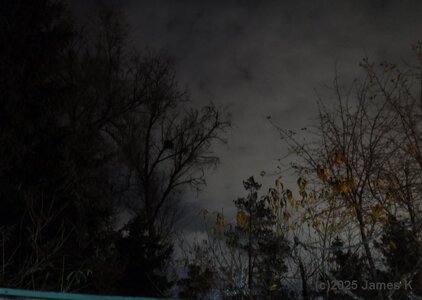
So I found the newer one of them has a couple options that *might* just work 'night' and 'night (tripod)' ... useing the latter I set it up on a tripod, pointed up & took a couple pic's just to see how it'd do with cloud at night.. It is pretty slow taking a photo in that mode.
They're pretty 'grainy' when viewed full resolution, but shrunk down not too bad. Considering how much brighter it made that cloud look, it *might* just work. Now I just need an aurora on a clear night. .lol.

It also has a timelapse option (not sure how that works, or if you can combine with night mode, but that may be interesting to play with...)
 

Attachments

  • t25_DSCF0147.jpg
    t25_DSCF0147.jpg
    214.2 KB · Views: 3
Back
Top